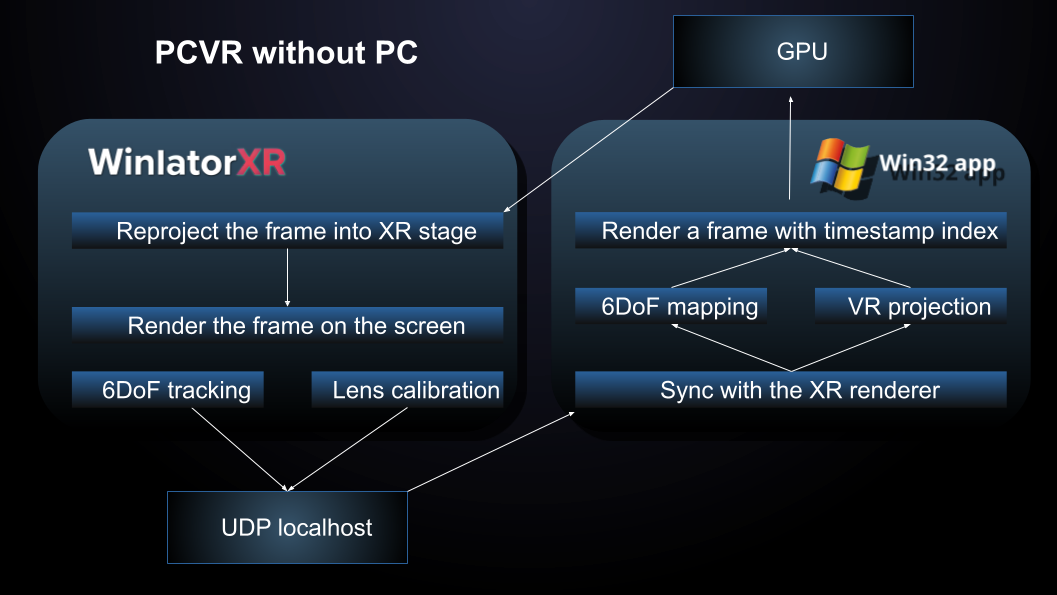
Rendering flow between WinlatorXR and sandboxed Windows app
WinlatorXR's API provides 6DOF tracking data and controller inputs over UDP for use in games and mods within a container.
The XR API is an experimental and continuously evolving feature of WinlatorXR. As development progresses, multiple versions of the API are maintained to ensure long-term compatibility and to prevent existing projects from breaking as improvements and refinements are introduced. Because the API is still under active development, it is not yet designed to function as a complete replacement for the OpenXR runtime. At this stage, it must be implemented on a per-game or per-mod basis, allowing developers to selectively integrate XR functionality where needed.
Some features of XR API include:
Rendering flow between WinlatorXR and sandboxed Windows app
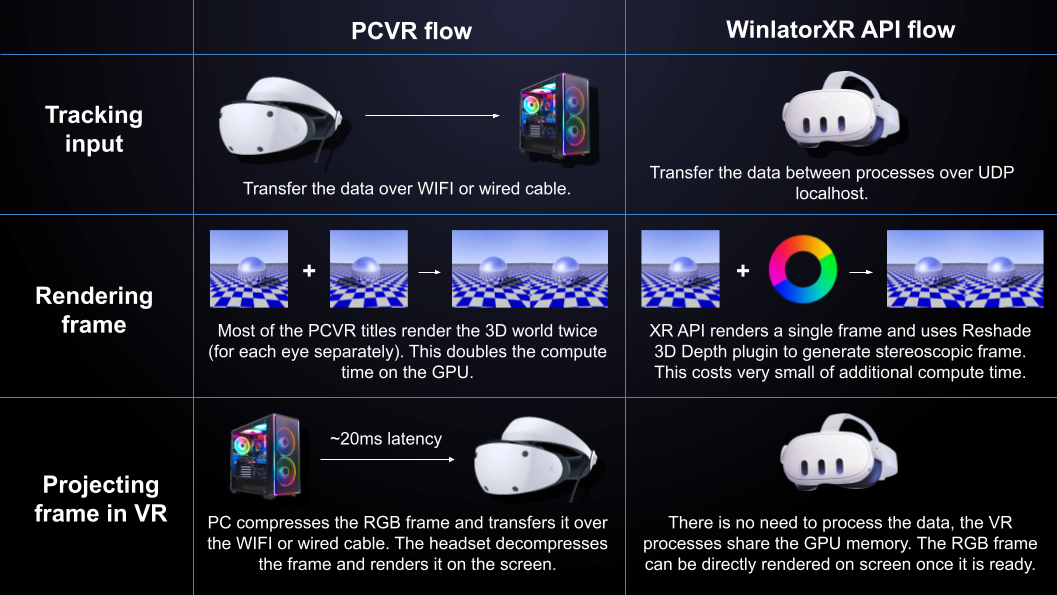
The major difference between PCVR and WinlatorXR API
The Windows app/game has to sent data on localhost:7278 as string of float numbers separated by space:
| Field | Type | Description |
|---|---|---|
| L_HAPTICS | Float | Left controller vibration duration (frames), this will be forwarded to bHaptics/ProTube accessory arm accessory (if available) |
| R_HAPTICS | Float | Right controller vibration duration (frames), this will be forwarded to bHaptics/ProTube accessory arm accessory (if available) |
| MODE_VR | Integer |
0 = Disable (no UDP data are sent), 1 = Enable VR, 2 = Screen mode (no automatic head tracking) 3 = Screen mode with head tracking mapped to mouse in 3DoF immersive mode |
| MODE_3D | Integer | 0 = No 3D, 1 = SBS, 2 = AER, -1 = User controlled |
| HMD_FOVX | Float | Custom horizontal FOV (degrees, if > 1) |
| HMD_FOVY | Float | Custom vertical FOV (degrees, if > 1) |
3D mode defines which method is going to be used to render stereoscopic frames
| 3D Mode | Description |
|---|---|
| Side-by-Side (SBS) | The left half of the rendered frame is displayed to the left eye, and the right half is displayed to the right eye. |
| Alternate Eye Rendering (AER) | Set the blue frame sync pixel to: 0 when rendering the left eye, 255 when rendering the right eye Rapidly alternating between left and right frames creates the stereoscopic 3D effect. |
| User controlled | User can select in XR settings whenever SBS or flat mode should be used. |
The Windows app/game could sent data on localhost:7728 as string of codes separated by commas to simulate an input
| Field | Type | Description |
|---|---|---|
K |
Array of integers | XServer keycodes separated by comma which should be simulated to press The full list of supported keycodes could be found here. Eg: "K,50,38" presses SHIFT_L and A at the same time |
M |
Array of booleans | Ones and zeros separated by comma representing state of the mouse buttons in order: BUTTON_LEFT, BUTTON_RIGHT, BUTTON_MIDDLE, BUTTON_SCROLL_UP, BUTTON_SCROLL_DOWN. Eg: "M,1,0,0,0,0" triggers left mouse click |
WinlatorXR provides data on localhost:7872 (or localhost:7873 if second instance needed) as a string separated by space:
| Section | Fields | Description |
|---|---|---|
| Float Array |
Left Controller L_QX, L_QY, L_QZ, L_QW L_THUMBSTICK_X, L_THUMBSTICK_Y L_X, L_Y, L_Z Right Controller R_QX, R_QY, R_QZ, R_QW R_THUMBSTICK_X, R_THUMBSTICK_Y R_X, R_Y, R_Z Headset (HMD) HMD_QX, HMD_QY, HMD_QZ, HMD_QW HMD_X, HMD_Y, HMD_Z HMD_IPD, HMD_FOVX, HMD_FOVY, HMD_SYNC |
Space-separated float values representing full 6DOF tracking data. • QX/QY/QZ/QW = Quaternion rotation • X/Y/Z = Position in 3D space • THUMBSTICK_X/Y = Analog input values • HMD_IPD = Interpupillary distance • HMD_SYNC = Frame synchronization value |
| Boolean States |
Left Controller L_GRIP, L_MENU, L_THUMBSTICK_PRESS L_THUMBSTICK_LEFT, L_THUMBSTICK_RIGHT L_THUMBSTICK_UP, L_THUMBSTICK_DOWN L_TRIGGER, L_X, L_Y Right Controller R_A, R_B, R_GRIP R_THUMBSTICK_PRESS R_THUMBSTICK_LEFT, R_THUMBSTICK_RIGHT R_THUMBSTICK_UP, R_THUMBSTICK_DOWN R_TRIGGER |
Boolean string containing characters: T = TRUE F = FALSE Values are transmitted in the exact order shown. |
| Float Array |
Headset (HMD) HMD_ALTITUDE Left Controller LG_QX, LG_QY, LG_QZ, LG_QW Right Controller RG_QX, RG_QY, RG_QZ, RG_QW |
Space-separated float values representing additional 6DOF tracking data. * HMD_ALTITUDE = Height between detected floor and headset start tracking position • LG/RG = Left/right controller grip pose, this pose is oriented upwards • QX/QY/QZ/QW = Quaternion rotation |
| Boolean States | Immersive, SBS |
Boolean string containing characters: T = TRUE F = FALSE Immersive – 3DoF immersive mode active SBS – Side-by-side rendering enabled |